
MFSC 2000W(G4) CW Fiber Laser Series User Guide(MAX Laser Souce)

MFSC 2000W(G4) CW Fiber Laser Series User Guide(MAX Laser Souce)
Copyright Notation
Copyright © Maxphotonics Co ., Ltd ( here after referred to as Maxphotonics). All rights reserved. You may not copy, modify, transmit or publish this
publication, in any form, in any media or by any means, without the prior written permission of Maxphotonics, except as allowed under applicable copyright
laws. Permitted copies shall bear the same copyright and proprietary notices that were contained on the ori ginal version.
Maxphotonics believes that the information provided is accurate and reliable; however Maxphotonics makes no warranty, representation,expression or
implication that this document can be used as reference in other occasions. Furthermore, Maxphotonics does not assume responsibility for any infringement
of patents or other rights of third parties due to use of the information contained in this document. Maxphotonics shall not be liable for errors contained in
this document or for direct or indirect damages of relevant equipment.
Maxphotonics and the Maxphotonics Logo are registered trademarks of Maxphotonics Co., Ltd., and the Logo does not break any regulations of
Trademark law.Maxphotonics grants no rights for patent or other intellectual property mentioned herein.
All information contained in this document is subject to change and revision without notice.
Company Profile
Found in 2004, Maxphotonics is one of the first fiber laser manufacturers in China. It is also the first in China to realize independent intellectual property rights
and vertical integration in the core technologies of fiber lasers and optical devices. One of the national high-tech enterprises. Maxphotonics has developed
into an internationally renowned laser manufacturer that develops, manufactures and sells fiber lasers and core optical components. It is the second largest
domestic fiber laser manufacturer in the domestic market.
Maxphotonics specializes in the research, development, production and sales of fiber lasers, including pulsed fiber lasers, continuous fiber lasers and direct
diode lasers. It also implements pump sources, combiners, fiber gratings, isolators, laser output heads, and stripping. Optical devices such as molds, acousto-
optic modulators, and pattern matchers are produced autonomously. Products are widely used in marking, engraving, cutting, drilling, cladding, welding,
surface treatment, rapid prototyping and additive manufacturing processes.
CONTENT
Company Profile …………………………………………………………………4
Chapter 1 Characteristic Description …………………………………..7
Chapter 2 General Safety Information …………………………………..8
1-Safety Conventions ……………………………………………………………8
2-Laser Protection ………………………………………………………………..9
3-Reference Standard …………………………………………………………10
4-General Safety Instructions ……………………………………………….11
5-Additional Safety Information……………………………………………..16
Chapter 3 Product Description …………………………………………..17
1-Features…………………………………………………………………………17
2-Module Configuration ……………………………………………………….17
3-Laser Model Designation Codes …………………………………………18
4-Certification …………………………………………………………………….18
5-Front Panel Description …………………………………………………….18
6-Back Panel Description …………………………………………………….19
7-Optical Output Terminal …………………………………………………….20
Chapter 4 Specification……………………………………………………..21
1-Optical Characteristic Parameters ………………………………………21
2-General Characteristic Parameters ……………………………………..22
3-Water Cooling Condition……………………………………………………22
4-QBH Water Cooling Condition ……………………………………………23
5-Installation Environment Requirements………………………………..24
6-Structural Layout ……………………………………………………………..25
Chapter 5 Disassembly Guide…………………………………………….26
1-Disassembly Step…………………………………………………………….26
2-Packing List…………………………………………………………………….27
Chapter 6 Operation Guide ………………………………………………..28
1-Notice…………………………………………………………………………….28
2-Electrical Power Connection ………………………………………………28
3-Extension Interface…………………………………………………………..29
4-Fiber Connector Inspection and Cleaning Guide ……………………30
5-Start Steps ……………………………………………………………………..34
6-Mode Description …………………………………………………………….34
7-Software Description ………………………………………………………..35
8-Error List ………………………………………………………………………..39
Chapter 7 Service and Maintenance ……………………………………41
1-Maintenance Notes…………………………………………………………..41
2-Service Statements ………………………………………………………….42
Chapter 8 Warranty Statements ………………………………………….43
1-General Items………………………………………………………………….43
2-Warranty Limitations…………………………………………………………43
Chapter 1
Characteristic Explain
MFSC 2000X (G5) CW Fiber Laser Series products provide a wide range of wavelength from 1060nm to 1100nm.The lasers are water-cooled and
maintenance-free and with a wall plug efficiency of more than 30% and deliver high efficiency, high reliability and high performance.
Maxphotonics’ MFSC 2000X (G5) CW Fiber Laser Series are Class 4 laser products and are designed and tested with safety. By following this User Guide
and applying sound laser safety practices, it will be a safe and reliable device.
Laser light exhibits unique characteristics that may pose safety hazards.
Therefore, the laser light can’t be normally associated with other light sources, and all operators and people near the laser must be aware of these special
hazards.
In order to ensure the safe operation and optimal performance of the product, please follow all warnings and safety instructions in this guide during process of
operation, maintenance and service.
For ensuring the safety of operators, operators are urged not to open the equipment privately at all times. There are no user serviceable parts, equipment
or assemblies associated with this product. Lasers of unauthorized disassembly shall not be subject to warranty.
Chapter 2
General Safety Information
1 -Safety Conventions
All safety warning symbols during operating process of the laser include:

NOTE :
◎ This device is classified as a high power Class IV laser instrument. It may emit up to 1000X average power from 1060nm to 1100nm. This level of light
may cause damage to the eye and skin. Despite the radiation being invisible, the beam may cause irreversible damage to the retina. Laser safety eyewear is
not provided with this instrument, but must be worn at all times while the laser is operational.
2-Laser protection
1.Laser Protection Requirements
You must wear the safety protective glasses while operating the laser, and rationally select the safety protective glasses according to the lasing wavelength
of the laser. If the device is a tunable laser or Raman product, it emits light over a range of wavelengths and the end user should confirm the laser safety
eyewear used protects against light emitted by the device over its entire range of wavelength.
2.Laser Protective Equipment Suppliers
Maxphotonics recommends material or equipments provided by following laser protective equipment suppliers for you, including LaserVision USA, Kentek
Corporation, Rochwell Laser Industries, etc. All the supplier information is provided by Maxphotonics only for the convenience to use, so Maxphotonics
assumes no responsibility for any problem caused by using the products of above mentioned suppliers.
3-Reference Standard
Electromagnetic compatibility and anti-interference:
EN 55011: 2010
EN 55024: 2010 + A1: 2015
EN 55032: 2015
CISPR 11
FCC PART 15 Class A
ICES-003 issue 6, Class A
EN 61000-3-3: 2013
EN 61000-3-2: 2014
EN 61000-4-2: 2009
EN 61000-4-3: 2006 + A2: 2010
EN 61000-4-4: 2012
EN 61000-4-5: 2014 + A1: 2017
EN 61000-4-6: 2014
EN 61000-4-8: 2010
EN 61000-4-11: 2004 + A1: 2017
Power supply safety:
EN 61010-1: 2010
Laser safety:
EN 60825-1: 2014
CDRH 21 CFR 1040.10
Functional safety:
EN 60950-1: 2006 + A11: 2009 + A1: 2010 + A12: 2011 + A2: 2013
Please note:
◎ Performances of Maxphotonics MFSC laser meet the CE EMC certification requirements, the EMC requirements specified in “EMC Directive” of European
market, the anti-interference requirements specified in “EMC” standard EN55011 emission and EN61326-1: 8006, and the emission requirements of group 1
classification A specified in EN55011.
◎ In accordance with relevant national standards and requirements, the laser must be classified according to its output power and laser wavelength. All MFSC
1000X-1500X CW Fiber Laser Series products with high power belong to Class 4 products (according to section J,1040.10 (d) of Part Ⅱ , 21 CFR).
◎ According to the standards of EU, the equipment belongs to Class 4 instrument (according to Chapter 8, EN 60825-1).
4-General Safety Instructions
1.Specular Reflection
There are often numerous secondary laser beams produced at various angles in the output port of the laser. These divergent beams are produced when the
primary beam of laser reflects off a smooth surface, and they are called specular reflections. Although these secondary beams may be less powerful than the
total power emitted from the primary beam, the intensity may be great enough to cause damage to the eyes and skin as well as surface of materials.
WARNING:
◎ You must exercise caution to avoid/minimize specular reflections as these laser radiations are invisible!
2.Safety Instructions of Accessories
The photosensitive elements integrated in laser-related optical accessories may be damaged by laser exposure, such as video cameras, photomultiplier tubes,
and photodiodes. Attention should be paid to related device protection.
WARNING:
◎ The Maxphotonics MFSC laser light is strong enough to cut or weld metal, burn skin, clothing and paint. In addition, this light can ignite volatile substances
such as alcohol, gasoline, ether and other solvents. During the operating process, the flammable materials around the laser must be isolated.
3.Optical Operating Instructions
We strongly recommend that you read the following procedures before operating the laser:
(1)Never look directly into the laser output port when the power is turned on.
(2)Avoid positioning the laser and all optical output components at eye level.
(3)Equip with laser beam casing.
(4)Remove the end-cover before switch ON laser. Or else the output head will be damaged irreversibly.
(5)Ensure that all personal protective equipment is suitable for the output power and wavelength range of the laser.
(6)Use the laser in a room with access controlled by door interlocks. Post warning signs. Limit the safety areas to operate the laser.
(7)Please do not operate laser in darkened environments.
(8)Do not turn on the laser without an optical coupling fiber or the optical output connector.
(9)Do not install or detach cutting heads or collimators when laser is active.
(10)Carry out commissioning, calibration and focusing at low output power and then increase the output power gradually when the calibrating and
focusing work is done.
(11)If the equipment is operated in a manner not specified in this document, the protection devices and performance of the equipment may be impaired
and the warranty will be voided.
CAUTION :
◎ The output of the laser is delivered through a lens with an anti-reflection coating. If the backward-stage light path of your laser has the optical lens, please
strictly inspect the lens of the output head and the backward-stage lens of the laser, and ensure that there is no dust and any other impurity on the lens.
Please note that any macroscopic attachment may cause extreme damage to lens or burn the laser or any backward-stage light path equipment.
◎ For cleaning instructions of the lens, please refer to the “Optical Fiber Connector Inspection and Cleaning Guide”.
◎ Hot or molten pieces of metal may be produced when the laser is under operation. Exercise caution if debris is produced in operation.
◎When implement commissioning and calibration of laser output, it’s necessary to set the quality of the spot emitted from the laser at low power levels via an
infrared viewer, and then gradually increase the output power.
WARNING :
◎ Make sure that the individual protective equipment meets the output power and wavelength range of the laser.
◎ Never look directly into the optical fiber or the collimator, and make sure you wear the safety protective glasses in each operation.
4.Electrical Operating Instructions
We strongly recommend that you read the following procedures before operating the laser:
(1) Please ensure that the equipment casing is well grounded, and any interruption in the grounding circuit may cause personal injury;
(2) The power supply connected to the equipment, please make sure that the protection ground is connected before use;
(3) In order to reduce the risk of fire, the line fuses can only be replaced by the same type and the same level if necessary, and cannot be replaced by other
fuses or materials;
(4) Ensure that the input AC voltage of the laser is normal AC mains voltage (single-phase AC 200-240VAC-2000X(G5)), and the wiring is correct. Any wrong
wiring method may cause personal injury or equipment damage;
(5) There are no parts, components or components that the user needs to repair by himself. All maintenance work needs to be done by Chuangxin laser
professionals;
(6) Do not remove the casing, disassemble the laser and damage related labels, there is a risk of electric shock or burns;
(7) Any product that has been disassembled and disassembled will no longer enjoy warranty rights.
WARNING :
◎ The input voltage of the laser is (single-phase alternating current 200-240VAC-2000X(G5)), there is a danger of electric shock. All related cables and
connecting wires have potential hazards.
5.Environment Conditions and Precautions
For ensuring the safety of the laser working area, suitable enclosures shall be applied, including but not limited the laser safety signs and the interlocking
devices. Corresponding operators must be trained and examined and know the normal safety specifications for operating the laser.
Meanwhile, it is important that the output components shall not be installed at eye level. Because of interaction of the laser and the metal material, the
radiation of high-level ultraviolet light or visible light may be produced. Make sure that the laser is provided with the protective cover to prevent the eyes or
other parts of human bodies from damage by radiation.
We recommend that you comply with the following operating measures to prolong the service life of the laser:
(1) Please ensure that the working area is properly ventilated and the laser is placed in a cabinet with temperature and humidity control and dustproof
function.
Do not expose the laser to high temperature and high humidity.
(2) Operating the equipment at high temperatures accelerates aging, increases current thresholds, and reduces laser sensitivity and conversion efficiency. If
the device is overheated, please stop using it and ask for help from Chuangxin Laser.
Caution:
◎ Please operate the equipment carefully to avoid accidental damage to the equipment.
◎ If the laser is placed in an environment below 0°C, be sure to add a corresponding proportion of antifreeze to the water tank of the chiller. If the machine is
not used for a long time, be sure to drain the water in the inlet and outlet channels (high-pressure air gun is recommended) to prevent the residual water
from freezing and damaging the water-passing devices.
5-Additional Safety Information
For additional information regarding Laser Safety, please refer to the list below :
Laser Institute of America (LIA)
13501 Ingenuity Drive, Suite 128
Orlando,Florida 32826
Phone:407 380 1553,Fax: 407 380 5588
Toll Free:1 800 34 LASER
American National Standards Institute
ANSI Z136.1, American National Standard for the Safe Use of Lasers (Available through LIA)
International Electro-technical Commission
IEC 60825-1,Edition 1.2
Center for Devices and Radiological Health
21 CFR 1040.10 – Performance Standards for Light-Emitting Products
US Department of Labor – OSHA
Publication 8-1.7 – Guidelines for Laser Safety and Hazard Assessment.
Laser Safety Equipment
Laurin Publishing
Laser safety equipment and Buyer’s Guides
Chapter 3
Product Description
1-Features
MFSC(2000X G5) CW Fiber Laser Series are compact and efficient and high quality laser output lasers developed for industrial application. They are mainly
applied to the fields of puching, welding, cutting, etc.
Main Features:
1、High-quality laser output
2、High power, high efficiency
3、High reliability, long service life
4、Compact, rugged package
5、Extension programming interface
Applications:
1、Industrial applications
2、Scientific research
2-Module Configuration
Maxphotonics offers many configurable modes. This manual will give complete instructions for all modes, please refer to section 6.3-6.6.
3-Laser Model Designation Codes
| Model | Model Coding Rules |
| MFSC-2000X(G5) | Maxphotonics Single-mode CW Fiber Laser 2000X G5 |
4-Certification
Maxphotonics certifies that this equipment has been thoroughly tested and inspected and meets published specifications prior to shipping. Upon receiving
your equipment, check whether the packaging and accessories have been damaged in transit. If damage is apparent, please contact Maxphotonics
immediately.
5 – Front Panel Description

| ITEMS | FUNCTION DESCRIPTION |
| (OFF ON) Key Switch | Power switch of laser |
| (EMERGENCY STOP)Emergency Stop Switch | Emergency stop |
| (START) Start Switch | Start laser (on-off signal of hardware) |
| ALARM | Abnormal situation light of laser |
| ACTIVE | Normal situation light of laser |
| POWER | Power light of laser |
6-Back Panel Description

| ITEMS | FUNCTION DESCRIPTION |
| AC 220V (MFSC-2000X) (G5) | 200-240VAC AC power input |
| POWER (MFSC-2000X) (G5) | 200-240VAC AC power switch |
| CTRL | External control connector |
| ETHERNET | Ethernet port |
| RS232 | RS232 interface |
| WATER OUT | Water cooling output port |
| WATER IN | Water cooling input port |
| OPTICAL OUTPUT | Laser output connector |
7-Optical Output Terminal
1 .Optical Output Head
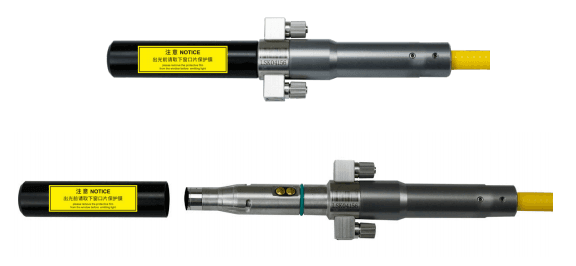
The optical output head come with a protective window that can be replaced if damaged. Please refer to about the cleaning method.
Make sure that the black end cap of the QBH head is removed prior to use and is usually arranged with the laser.
Fiber output head (G4.2 QBH head)

Chapter 4
Specification
1 -Optics Characteristic Parameters
| No. | Characteristics | Test conditions | Min. | Nom. | Max. | Unit |
| 1 | Operation mode | CW/Modulated | ||||
| 2 | Polarization | Random | ||||
| 3 | Output power MFSC-2000X(G5) | 100% CW | 2000 | W | ||
| 4 | Tuning range of output power | 2 | 100 | % | ||
| 5 | Emission wavelength | 100% CW | 1070 | 1080 | 1090 | nm |
| 6 | Spectrum width(3dB) | 100% CW | 3 | 5 | nm | |
| 7 | Short-term power instability | 100% CW>1h | ±1 | ±2 | % | |
| 8 | Long-term power instability | 100% CW>24h | ±3 | ±5 | % | |
| 9 | Beam quality BPP | 50um-QBH Output | 1.5 | mm x mrad | ||
| 30um-QBH Output | 0.7 | |||||
| 10 | Laser switching ON time | 10%→90%Output | 50 | 100 | μs | |
| 11 | Laser switching OFF time | 90%→10%Output | 50 | 100 | μs | |
| 12 | Modulation rate | 100%Output | 20 | kHz | ||
| 13 | Red guide laser power | 100%Output | 200 | μW | ||
| 14 | Feeding fiber cable length MFSC-2000X(G5) | 50um-QBH Outpu | 15 | |||
| 30um-QBH Output | 10 | |||||
| 15 | Feeding fiber core size | 50/30 | μm | |||
| 16 | Feeding fiber cable bending radius | 200 | mm | |||
| 17 | Output form | Standard QBH(LOC) | ||||
2 -General Characteristic Parameters
| No. | Characteristics | Test conditions | Min. | Nom. | Max. | Unit |
| 1 | Operating Voltage MFSC-2000X(G5) | 200 | 220 | 240 | VAC | |
| 2 | Input Power MFSC-2000X(G5) | 100% Output | 7 | KW | ||
| 3 | Operating Ambient Temperature | 10 | 40 | ℃ | ||
| 4 | Operating Ambient Relative Humidity | 10 | 85 | % | ||
| 5 | Cooling Method | Water-cooling | ||||
| 6 | Storage Temperature | 100% CW | -10 | 60 | ℃ | |
| 7 | Dimensions | 100% CW>1h | 482.6*550*133 (W*D*H) | mm | ||
| 8 | Weight MFSC-2000X(G5) | 100% CW>24h | 42±2 | kg | ||
3-Water Cooling Condition
| No. | Characteristics | Min. | Unit |
| 1 | Cooling Method | Water Cooling | |
| 2 | Chiller Set Temperature | 26±1 | ℃ |
| 3 | Hydraulic pressure | ≥ 4 | bar |
| 4 | Water Flow Requirements | 20 | L/min |
| 5 | Chiller Rated Cooling Capacity Requirements | 4.5 | kw |
CAUTION :
◎ The Chiller needs to meet the requirements of the above table under the conditions of a circulating temperature of 40 ° C and an outlet temperature of 26±1
° C.
◎ The above recommended water pressure requires the pressure drop of the main line Δp ≤ 0.5bar. If this value is exceeded, the main circuit water pressure
should be increased accordingly.
◎ The cooling water and filter element need to be replaced once a month; before winter (referring to low temperature environment of 0° C and below), the
cooling water should be replaced with a suitable antifreeze (for example, glycol antifreeze, excessive addition is strictly prohibited, antifreeze thermal
conductivity coefficient)
Low, excessive addition may cause poor heat dissipation). After the winter is over, the antifreeze should be replaced with distilled water and the filter element
should be replaced to restore the maintenance frequency once a month.
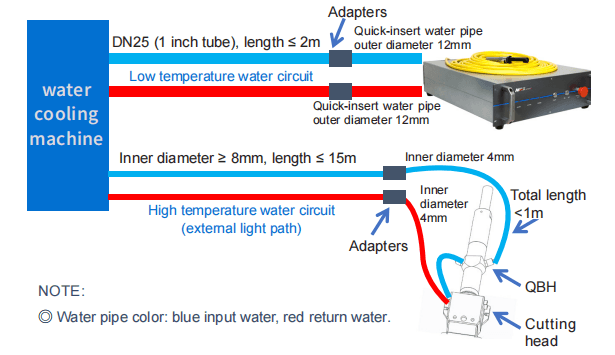
4-QBH Water Cooling Condition
| Cooling Method | Water pipe size requirement | Water Flow Rate(L/min) | Hydraulic pressure(bar) | Cooling Temperature(℃) |
| Water cooling | Outer diameter* inner diameter=Φ6*Φ4 | ≥2 | ≥3 | 28-30 |
NOTE:
◎External light path tube inner diameter ≥ 8mm, length ≤ 15m;
◎The length of the Φ6 pipe connected to the LOE after switching from the external light path is ≤ 1m;
◎QBH is connected in series with the cutting head;
◎The above recommended external light path water pressure requires the pressure drop of the cutting head Δp ≤ 1.5bar. If this value is exceeded, the external
light path water pressure should be increased accordingly.
5-Installation Environment Requirements
1.The ambient air cleanliness grade requirement for optical fiber output head installation: 1000 or more stringent grade. Suggestions for Configuration of
Standard Purification Workbench;
2.laser working environment temperature:10°C–40°C;
3.laser working environment humidity:10%-85%;
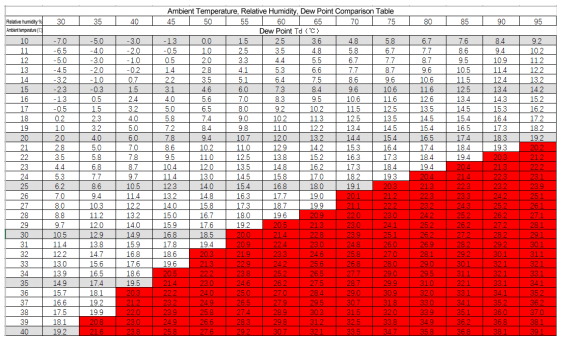
4.Avoid the condensation environment,the specific control standards are as follows:
NOTE :
◎In order to ensure a good operating environment of the laser, to reduce the probability of failure due to condensation. We recommende to prepare an air
conditioned room for the laser, so that the temperature in the air-conditioned room is ≤ 30 ° C, and the relative humidity is ≤ 70%. The water cooler should
be placed in a different space from the laser. It is forbidden to place the water cooler in the air conditioned room;
◎ The laser head works at circulating temperature. In order to avoid condensation on the laser head, it is necessary to adjust the temperature of the cooling
water of the external light path to room temperature. It is forbidden to cool the laser head with low-temperature cooling water.
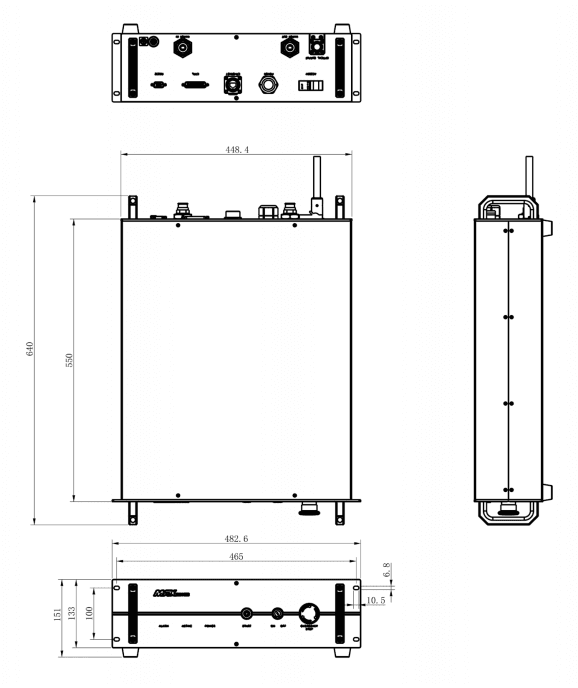
6-Structural Layout
Laser Three Views.(Unit:mm)
Chapter 5
Disassembly Guide
1-Disassembly Step
The laser belongs to the precise valuables, so Maxphotonics recommends the following steps to unpack the packing box.
Please unpack according to the following steps:
(1) Place the package containing the laser device on a horizontal platform, such as a floor or a large table;
(2) Open the main package and remove the foam cover;
(3) The fiber is placed on the top plate of the laser. Please take it out carefully to ensure that the maximum bending radius of the fiber optic cable is >200mm.
When removing, it is recommended that the three people cooperate with each other. Two people lift the laser body and the other person is responsible for
removing the cable.
(4) Remove the foam cover and take out the accessory.
(5) Please check the accessories according to the Packing List.
(6) Please keep all the items after unpacking in case of future transportation or storage.
CAUTION:
◎ If any damage of the external package and internal parts has been found upon receipt of product, please contact Maxphotonics Co., Ltd. or designated
agent immediately.
2-Packing List
| No. | Names of fittings | Description | Unit | Quantity |
| 1 | Fiber Laser | MFSC XXXX | Pc | 1 |
| 2 | External signal wire | 3 m | Pc | 1 |
| 3 | Power Keys | Pc | 2 | |
| 4 | Category 5 network cable | Pc | 1 | |
| 5 | Round head cotton swab | Pc | 1 | |
| 6 | Pointed cotton swab | Pc | 1 | |
| 7 | Superfine dust-free cloth (2*2) | Pc | 6 | |
| 8 | Sample of QBH water pipe | Ф6x4mm | Pc | 1 |
| 9 | Sample of water pipe of laser | Ф12x8mm | Pc | 1 |
| 10 | Lens protective film | Pc | 6 |
Chapter 6
Operation Guide
1 – Notice
Caution:
◎ Please refer to Section “Detail Specification Table” for proper electrical power.
◎ Refer to Section “General Safety Instructions” for inspecting whether the configuration environment of peripheral work of the laser meets the requirements.
2 – Electrical Power Connection
A power input cord of the laser shall be connected to single-phase AC current.
Please make sure the grounding cord is perfectly connected, or the laser may be damaged potentially.
For ensuring the safety feature, Maxphotonics recommends you connect a 50A circuit breaker (air switch) in series between the power supply unit and the
laser.
This electric power shall be in close proximity to the power supply unit of the equipment and can be easily disconnected.
Refer to Section “Detail Specification Table” to determine your electrical specification if you have any problem about wiring.

3- Extension Interface
The laser CTRL interface is a high quality DB25 interface that provides a variety of signals for the functional control of the laser, as described below:
2000X(G5) DB25 interface
| Ctrl Interface Pin | Wire Color | Function Description | Notes | Quantity |
| 18 | Red | Enable input + | HIGH:20VDC ≤ V ≤24VDC LOW:0VDC ≤ V ≤ 5VDC 5mA ≤ I ≤15mA | 1 |
| 5 | Red And White | Enable input – | 1 | |
| 17 | Black | Modulation input + | HIGH:20VDC ≤ V ≤24VDC LOW:0VDC ≤ V ≤ 5VDC 5mA ≤ I ≤15mA | 2 |
| 4 | Black And White | Modulation input – | 1 | |
| 16 | Yellow | External light + | HIGH:20VDC ≤ V ≤30VDC LOW:0VDC ≤ V ≤ 5VDC 5mA ≤ I ≤15mA | 1 |
| 3 | Yellow Black | External light – | 1 | |
| 15 | Green | DA (0-10V) input + | Control laser output power (1V-2.5%,10V-100%) | 6 |
| 2 | Green And White | DA (0-10V) input – | 1 | |
| 14 | Brown | Fault output 1 | Dry contact output, ON- fault, OFF- normal, (contact voltage V ≤ 30VDC, contact current I ≤ 100mA) | 1 |
| 1 | Brown And White | Fault output 2 | 6 | |
| 19 | Blue | Interlock+ | ±Short connection: the laser normally controls the light ±Disconnected: the laser is locked and cannot emit light | |
| 6 | Blue And White | Interlock- | ||
| Ground wire | Green Yellow | Ground wire |
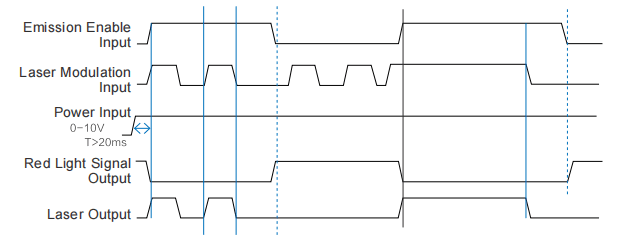
External Control Signal Timing
4-Fiber Connector Inspection and Cleaning Guide
1.Tools
For cleaning a fiber connector you need the following materials:
(1) Powder-free rubber gloves or fingerstall
(2) Lint free optical cleaning wipes and/or swabs
(3)Ahydrous ethanol(Optical level, pure >99.5%)
(4)Compressed air (oil free, water free)
(5)Microscope
(6)Light source
CAUTION :
◎ It is imperative that the protective lens are checked for dirt, dust, or damage before you use the fiber connector. It will lead to heavy damage if the laser
equipped with dirty or damaged fiber connector.
◎ The use of a dirty fiber connector can result in laser damage, which is not covered by the Maxphotonics’ warranty.
◎ The laser will not be covered by the Maxphotonics’ warranty if the buyer change the laser without permission.
IMPORTANT :
◎ It is imperative that you wear powder-free rubber gloves during this cleaning procedure! It is hereby stated that damage to the fiber connector can occur
due to mishandling, the use of incorrect cleaning procedures, or chemicals for cleaning. This is not covered by the Maxphotonics’ warranty.
◎ Ethanol concentration should be above 99.5% during cleaning.
2.Operating Procedures
Cleaning and maintaining according to the following procedures:
(1) Switch off the laser power, and place the key switch on position of ”OFF”;
(2)Remove the black outer protective sleeve and leave the white inner cap on and clean the fiber connector exterior with optical cleaner, wipe it with a clean
optical wipe and dry it with compressed air.
(3)Place fiber connector in the holder of the microscope, remove the white inner cap from the connector.
(4)Focus the microscope onto the connector surface so that the protective lens can be seen clearly from the microscope.
(5)Check the surface carefully. If some contamination is visible on the surface, cleaning is necessary:
- Put a few drops of alcohol onto the lint free swabs and throw away the excessive alcohol.
- Place the swabs on the dust via microscope.
- Cleaning the dust carefully, and move it to the edge of lens.
- Repeat these cleaning steps until all contamination is removed. Take a final check under the microscope.
(6) Reinstall the inner cap and the outer sleeve onto the cleaned fiber connector.
(7)Take out the cap and sleeve, then connect the fiber connector with cutting head quickly and fasten them. (Place the cap face down on a clean surface or
a lint-free wipe.)
Take out the cap and sleeve
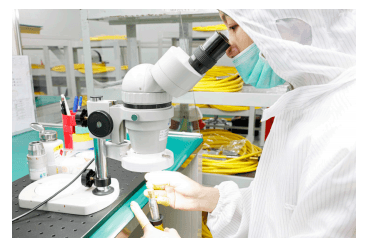
Install fiber connector under microscope
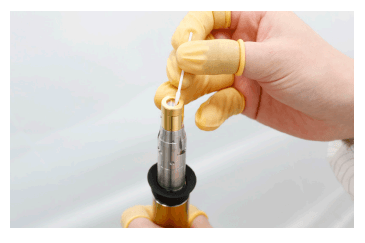
Cleaning protective lens with swabs
IMPORTANT:
◎Do not reuse non-woven cotton or cotton swabs.
◎Do not touch the protective lens of the fiber connector with your fingers.
◎ Do not blow directly with the mouth to protect the surface of the lens from dirt, which may cause new dirt.
◎Do not touch the tip of the cleaning swab with your fingers.
◎Please don’t forget to clean when you put back the protective cover and sleeve.
◎ When using compressed air, do not blow dirt directly from the front. Use side blowing to avoid dirt from entering the surface.
◎ If the fiber optic connector cannot be replaced immediately on the optical component, cover the tail with a protective cover that has been cleaned with
compressed air.
5-Start Step
WARNING:
◎ Make sure that all the electrical connections (including cooling water connections) are connected prior to use. All the connectors must be held
steady with screws if possible.
◎ NEVER look directly into the output fiber and make sure that you wear the laser safety eyewear while operating the product.
◎ Make sure all power is removed from the laser when wiring.
Starting procedures are as follows:
(1)Start the Chiller;
(2)Remove the end cap of the collimator;
(3)Make sure that the end surface of the collimator is clean and not covered with impurities;
(4)Make sure that the emergency stop switch is turned on;
(5)Open the power supply of the laser;
(6)Place the key switch of the front panel on position “ON”.
(7)Press the START button on the front panel. (For external control method)
6- Mode Description
The working modes of the laser are as follows:
(1)Internal Control: Control the output of the laser via control software. This mode is used for checking whether the laser is normal or not, and testing the
laser power.
(2)External Control: Control the output of the laser via external control line (EE, modulation, 0-10V analog voltage and START button). This mode is used
for cutting and welding.
7-Software Description
(1) Enter “Chuangxin Laser Official Website”-“Download Center”-“Install Software”, and download “G3 Series-Software Installation Guide”, “NET4.6”,
“G3-Series-n.n.n.n”. (The version is updated from time to time, subject to the official website announcement without notice.)
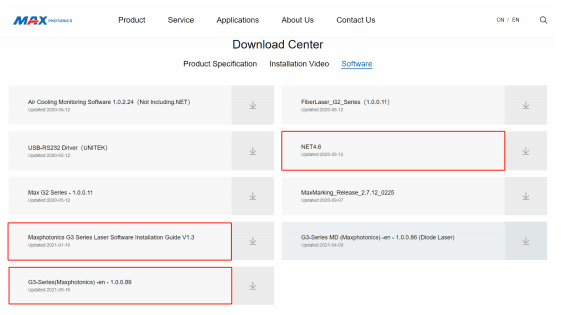
(2) Decompress the downloaded compressed package, and install the operating environment (NET4.6) and monitoring software (G3-Series-n.n.n.n) referring to
the “G3 Series-Software Installation Guide”. (Win10 system or system with .NET 4.6 installed, no need to install NET4.6).
(3) After installing the operating environment and monitoring software, a “G3-Series” shortcut will appear on the desktop.

(4) Check whether the communication interface of the laser backplane is RS232 or EtherNet, connect it to the PC, and power on the laser.
(5) Double-click the desktop “G3-Series” shortcut to open the monitoring software and enter the following connection interface.
(6) If the laser backplane is an RS232 interface, the monitoring software communication mode is selected as COM (the default is COM), and the
corresponding COM number is selected, and then click the “Login” button to try to connect with the laser.
(7) If the laser backplane is an EtherNet interface, select the communication mode of the monitoring software as IP2, enter the laser IP address (default is
192.168.0.178), and click the “Login” button to try to connect with the laser.
(8) Decryption page.
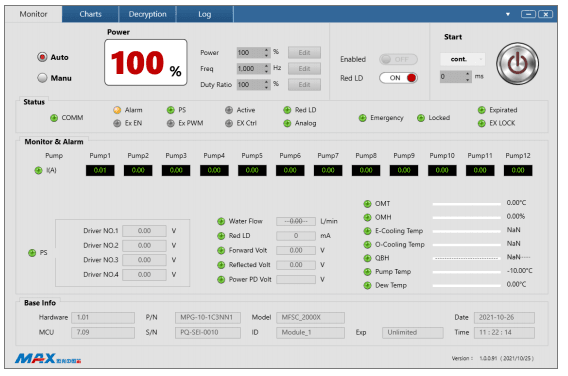
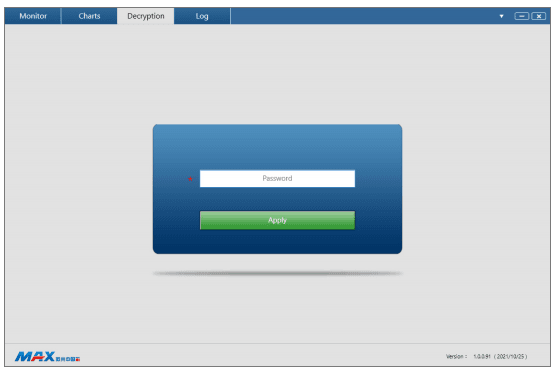
Tip: The software installation and use instructions specific details, official website software manual.
8-Error Listing
The fault alarm points set by the laser include:
| SN. | Message | Description | Trouble shooting |
| 1 | Front lamp warning | Laser internal light path testing fault | Operation leads to low output power of laser such as low modulation frequency, low peak power, low cutting power |
| 2 | Water cooling plate overheat warning | Overheat fault of water cooling plate | For overheat fault of water cooling plate, please check whether the pre set temperature of water-cooling machine meets the requirements |
| 3 | Emergency stop alarm | The emergency stop switch is pressed | Release the emergency stop switch, the laser will work again after being restarted; if this fault still exists, please contact Maxphotonics. |
| 4 | pump source temperature alarm | Chiller or laser internal pipeline failure | Please check the pressure of the chiller water pressure gauge; check whether the water inlet and outlet pipes are reversed; check the water pipes or use air guns to empty the pipes. |
| 5 | Overcurrent warning | Overcurrent fault of laser | If ”0-10V” DA value exceeds the pre set value, the internal overcurrent fault will occur; if the fault is not caused by this reason, please contact Maxphotonics. |
| 6 | QBH alarm | QBH is not plugged in/ QBH temperature is too high | Usually the QBH head is not inserted into the cutting head or QBH The contact of the head contact and the contact of the cutting head are not in good contact, please check whether the QBH head is properly inserted. If you check that the QBH has been plugged in and the QBH head has no abnormalities in the water and heat dissipation, please check whether the processing equipment and the processed materials are abnormal, causing the QBH head to overheat. |
| 7 | Encrypted alarm | Laser encryption expires | The ALARM indicator and ACTIVE indicator on the front panel flash red and green alternately. Please contact Chuangxin customer service personnel to continue normal use. |
Chapter 7
Service and Maintenance
1-Maintenance Notes
CAUTION :
◎ No operator serviceable parts inside. Refer all servicing to qualified Maxphotonics personnel.
◎For ensuring that the repairs or replacement within the warranty scope can be carried out, and perfectly maintaining your interests, please submit application
to the Maxphotonics or the local representative after finding the faults. Upon receiving our authorization, you need to pack the product in a suitable package
and return it.
◎ You should keep the proof when finding any damage after receiving the product, so as to claim the rights to shippers.
IMPORTANT :
◎Do not send any product to Maxphotonics without RMA.
◎If the product is beyond the warranty period or the warranty scope, customers shall be responsible for the repairing cost.
CHANGE :
◎ We have the rights to change any design or structure of our product, and the information is subject to change without notice.
2-Service Statements
More problems regarding the safety, set-up, operation or maintenance please reading this “User Guide” carefully and flowing the operation steps stictly.
Please call the Customer Service Department for other questions.
Your problems will be follow-up by our technical support group after verified.
If the problems cannot be solved , you may need to return the product to Maxphotonics for further troubleshooting.
Chapter 8
Warranty Statements
1-General Items
Maxphotonics Co.,Ltd. carries out warranty for any defect of the product caused by its material and production technology within the warranty period agreed
in contract, and ensures that its product meet the relevant quality and specification requirements specified in the document under normal use condition.
Maxphotonics Co.,Ltd. rationally determines to repair or replace the products with faults caused by its material or production technology within the warranty
period, and repairs or replacement of all the products within the warranty scope are carried out according to the rest of the warranty period of primary
products.
2-Warranty Limitations
Under the following circumstances, the products, parts (including the fiber connectors) or equipment are not within the warranty scope:
(1)Tampered, opened, detached or reconstructed by personnel outside Maxphotonics;
(2)Damaged from misuse, neglect or accident;
(3)Used beyond the specification and technical requirements of the product;
(4)Indirectly damaged from users’ software or interfaces;
(5)Improper installation or maintenance, or operating under conditions not included in this manual;
(6)The fittings and the fiber connectors are not included in the warranty scope.
Customers are obligated to understand the information above and operate according to the User Guide and specification, or the faults arising there from are
not included in the warranty scope.
IMPORTANT :
◎ Within the warranty scope, purchasers must feedback within 31 days after finding the product defect.
◎ Maxphotonics does not grant any Third Party rights to repair or replace the parts, the equipment or other Maxphotonics products.
Where to Buy fibre laser cutting machine in the World?
Krrass was established in Singapore, formely GMS, and its production based in China was established in 1998. Our company deals in machinery and tools related to sheet metal fabrication. Partnering with world-renowned manufacturers, we are always on the lookout for user-friendly solutions to all your metal forming needs. If you need to know more about the bending machine, please click: fibre laser cutting machine